

- February 16, 2024
- by Koios Marketing Team
- Traffic
- 0 Comments
In this overview, we’ll cover 7 different ways you can figure out why your traffic dropped and show you how to monitor and mitigate traffic drops in the future.
Most of the time organic traffic drops for one of these seven reasons:
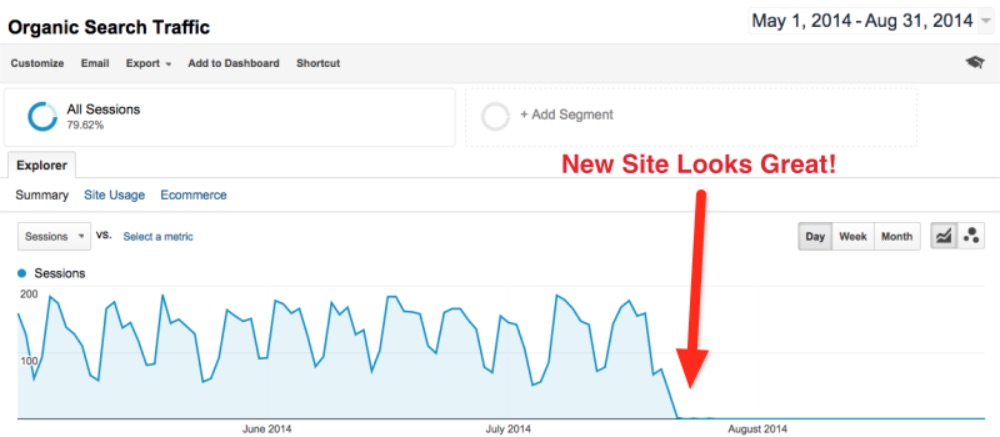
- Redesign and rebranding
- Updating a website without SEO oversight
- Content updates
- Changing the architecture of the site
- Domain migrations
- Google algorithm update
Technical issues
As a starting point for investigating drops, it’s best to figure out what’s changed on your site. Here are a couple of hacks that might help you determine why your traffic shifted.
7 Hacks for Diagnosing Traffic Drops
- Use your GSC coverage report to spot trends
- Use your GSC coverage report to check for URL bloat
- Use GSC page experience, Core Web Vitals, and crawl stats Reports
- Compare Bing and Google traffic
- Use Archive.org to find changes
- Crawl the website
- Use automated tagging
If there are any annotations in Google Analytics (GA) or release notes that’s going to really help figure out what’s changed but, often there aren’t so we have to get creative.
1. Use Your GSC Coverage Report to Spot Trends
One quick way to suss out what’s going on is to head to Google Search Console (GSC) and check the coverage reports.

Take a look at the graphs on the right side and note any patterns. Which graphs are going up or down?
For example, one this report, we can see a large increase in the number of noindex pages. So next, we’d ask, “does this correlate with the decrease in traffic?” Perhaps this site recently noindexed a bunch of pages by accident.
2. Use Your GSC Coverage
Report to Check for URL Bloat
A Google Search Console coverage report can also show you issues like URL bloat. URL bloat is when you add a significant number of website pages that have redundant or low-quality content making it more difficult for your own priority pages to get a high ranking.

The graph above shows an example of a site that released over 100,000s URLs in the past few months. This led to a steep dip in the impressions they were previously ranking for.
So, we don’t have a definitive answer here but it does give you an idea of what deserves more investigation because we can see the relationship between the increase in noindex URLs and decreased impressions.
It’s possible that Google was not indexing their recently added pages because they were redundant or thin. It’s also possible that this site could have been intentionally noindexing some pages and that caused this drop.
3. GSC Page Experience, Core Web Vitals, and Crawl Stats Reports
Significant performance changes can impact ranking so it’s worth checking these reports:
Core Web Vitals in Google Search Console
The Core Web Vitals report shows how your pages perform, based on real-world usage data.
Page Experience in Google Search Console

The Page Experience report provides a summary of the user experience of visitors to your site.
Crawl Stats in Google Search Console

The Crawl Stats report shows you statistics about Google’s crawling history on your website.
Notice the orange line is this Crawl stats report—this is the average response time. For clarity, the average response time refers to the average time Googlebot takes to download a full page.
As average response time increases the number of URLs crawled goes down. This isn’t necessarily a traffic killer but it’s something you should consider as a potential cause.

The crawl stats can also help detect issues with hosting. This helps answer where certain sub-domains of your site had problems recently. For example, they could be serving 500s or another issue Google is reporting.
The nice thing about GSC Page Experience, Core Web Vitals, and Crawl Stats reports is they only take you a minute or two to review. So, they are a great way to quickly get a read on the site and what problems could explain the traffic drop.
4. Compare Bing and Google Traffic
Here is a quick way to find out if you are responsible for the drop or Google is: look at your Bing organic traffic data.
If you see traffic dropped on Google but not on Bing, then Google is likely responsible.
If you see no divergence and organic traffic dipped on both Google and Bing, then it’s likely that you did something.

Good News: When you are responsible it’s much easier to fix. You can reverse engineer what you did and get your site ranking again.
Bad News: If Google is responsible for the dip then you are going to need to do some further analysis to figure out what they changed and why it’s impacting you. This may take some big data solutions that we’ll get into in the last section.
5. Use Archive.org to Find Changes
Archive.org can be really useful if you don’t keep documentation of historical site changes, which most don’t. In these cases, you can use Archive.org to see screenshots of every page and template of the site from before and after the traffic drop.
No alt text provided for this image
One major benefit is that Archive can go back years compared to GSC which only serves up the last 16 months of data.
6. Crawl the Website
To find technical problems you’ll want to do a crawl of the website. You can use tools like screaming frog or Sitebulb for this.
Crawling your site can help you find a host of technical issues like broken links, nofollow navigation links, search engine robots blocked in robots.txt, ect.
7. Use Automated Tagging
If you aren’t using automated tagging, you should. It’s a bit advanced but this is the best option when you have a large site and/or need to harness the power of big data to narrow down which keywords and pages are responsible for the dip in traffic.
Automated tagging for categories, intent, and page type allows you to:
- Easily find patterns in traffic drops
- Better understand ongoing traffic
- Retain knowledge from past analyses
- Make it easier to predict the impact of future SEO projects
Get a step-by-step walkthrough of how we used automated tagging to discover the cause of a nationally known eCommerce site. You can check out our recap blog on automated tagging here.
Got Website Traffic Problems?
If you’re watching you site traffic take a huge dive and need answers, we got your back. Our SEO Consultation services will identify the issue and get you back on track. Schedule a chat or reach out to us for an expert analysis of the cause and solution for you sudden decrease.
[Previously published on Localseoguide.com]
